What lives permanently in your laptop bag
...I got to the lecture hall and the projector wanted VGA...
These things live in the bag. They are not packed for a trip. The point of the list is that you never think about it again.
Written for anybody who walks out of the house with a laptop, for any reason — and especially for traveling, whether that is a few hours or a digital nomad's two years in El Salvador.
Printable checklist — free, like everything else here.
Back to Setting Up to Write a Thesis
One of two pages on practical free tools. Browse all 69.
Related links
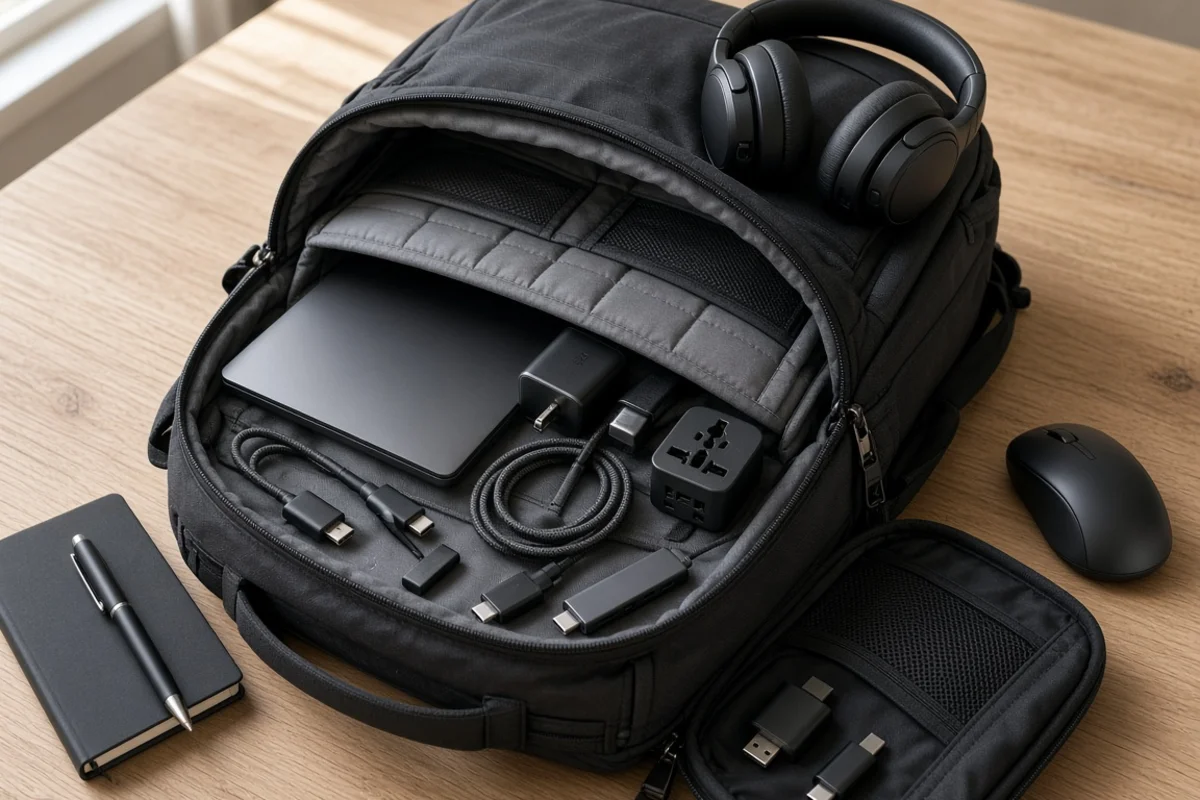
Two things end a working day away from home, and neither is the laptop.
A cable that fails, and a projector that wants a port you do not have.
Both cost a few dollars to prevent and neither can be fixed in a hotel room at ten at night.
Power and connectivity
Your laptop's power block, if it has one.
A multiport GaN wall charger. 65W or higher, with several USB-C and USB-A ports, so the laptop and the phone charge at once. If your laptop uses an old-style barrel plug, do not worry — most 65W chargers ship with a set of tip adapters. Make sure the right one is in the bag.
A compact power bank. 10,000mAh is enough to keep everything alive through a long transit day. Make sure it is FAA approved, or the local equivalent.
A global travel adapter with surge protection.
And one good braided USB-C to USB-C cable. Not an anonymous one from a drawer.
A good one will have:
- PD 3.1 Extended Range Power — 48V/5A, 240W support
- A stated data speed — 20Gbps, 40Gbps for USB4, or 80Gbps for USB4 v2 and Thunderbolt 5
- An e-Marker chip, and the official logos to prove it
Yes, all of that for a power cable. Feed the specification into a search or buy a name brand.
Video, and why you carry adapters rather than cables
Carrying a full HDMI or VGA cable is inefficient. Experienced travelers use a hub and short adapters instead.
The foundation is a USB-C multiport hub — HDMI, USB-A ports, and an SD card reader. It plugs into the laptop and provides the ports you actually need.
Then three small things in the pouch:
A short HDMI cable, three to six feet, slim and flexible. For a lecture hall or conference projector, or an external monitor when you are working.
An HDMI to VGA adapter. Many university lecture halls still run VGA projectors, and this is the dongle that saves the talk.
A USB-C to DisplayPort adapter, if you present on modern office monitors that favor DisplayPort.
Whichever direction your laptop's port faces, carry the adapter for the opposite one. Laptop has HDMI? Carry an adapter that converts to DisplayPort. Laptop has DisplayPort? Carry one that converts to HDMI.
If you work on more than one monitor
Three things decide what you can actually drive, and they are not the same thing.
What your laptop's ports can output. This is the real limit and most people never check it. A USB-C port may or may not carry video at all, and one that does may only support a single display. Look up your model before you buy anything.
What the hub can pass through. A hub with two HDMI ports does not necessarily drive two independent screens. Many mirror rather than extend, and many drop to 30Hz on the second output — which is unpleasant to read on all day.
And what cables you have with you. A hub that supports three displays is no use if you are carrying one HDMI cable.
For one external screen: the multiport hub above is enough.
For two: check that the hub advertises dual independent displays and states the refresh rate on both. If it does not say so, assume it mirrors.
For three: you are past what a travel hub does reliably on its own. A DisplayPort MST hub or a dock is the straightforward answer, and the laptop has to support MST — many do not, and Apple silicon has its own limits.
But before you give up: combine the paths you already have. If your laptop has its own video port, drive one screen from that and use the hub for the second and third. Work through every combination available to you — including an adapter from a USB-A port, if that is what it takes.
Whatever gets you to the number of screens you need, test that exact layout at home first.
And carry one cable per screen. The adapters are small. The cables are what you will be short of.
Productivity
A wireless travel mouse. Compact, low-profile, and one that works on glass. We use Logitech.
Noise-canceling earbuds or headphones. Essential in a loud airport and on a quiet remote call. Consumer Reports rates the Monolith BT-300ANC best of the inexpensive ones — about fifty dollars in 2026. Want the best? There are several good choices. We use the Sony WH series.
A good pen.
A tech pouch. One small case for every loose cord, dongle and drive. Without it they migrate to the bottom of the bag and tangle.
Personal and emergency
A couple of Band-Aids, a wet wipe, and a small notebook.
A face mask, depending on where you are going.
A mini multi-tool or scissors — something TSA-friendly, for a tag or a loose thread.
Mints or gum. After an airline meal, before you meet anybody.
An aviation Bluetooth transmitter — optional, and you may never need it. It connects wireless headphones to a seatback screen. Our founder has never carried one. He uses a cable to his wireless headphones on the aircraft that do not support Bluetooth, and more of them do every day. Do not buy one unless you really need it.
Two laptops
Our founder never travels with one.
A powerful laptop with a large screen for real work, and a light one for the plane or the train.
The comfort is the excuse. The insurance is the point. Hardware fails, gets stolen, or is dropped by somebody at an airport — and a candidate abroad with one dead laptop and a deadline is in genuine trouble.
Laptops are cheap now. A serviceable second machine costs less than a single lost week, and considerably less than a term.
And this is where cloud backup earns its keep. Working from the cloud keeps your dissertation device-independent — it does not live on the machine that just died, and picking up on the other laptop is a matter of signing in. More on that.
If you are working abroad for months, not days
For the digital nomads, for whom this lives in the bag is not a figure of speech.
Different problem. You are not packing for a trip. You are living out of the bag, and there is no store nearby that sells the replacement when something fails.
Carry two of the things that break. A second USB-C cable and a second plug adapter. They cost almost nothing and they are the two items that end a working day when they go.
Take the surge protection seriously. The wifi is advertised. The voltage stability is not. Beach towns and remote destinations frequently have poor power, and a laptop charger is not built for it. Find out where you can buy a UPS locally — or ship one in, and a spare.
Find out what the local electrical supply is actually like before you arrive — not after. More on why that matters at morethananeditor.com/backups.
And know what you would do if the laptop died tomorrow. Not the backup — the machine. Where you would buy one, what it would cost, and how long your work would be stopped.
One of two pages on practical free tools. Browse all 69.

